Warehouse to insights,
in one scroll.
The full DecisionBox loop — connect, describe, run, validate, ship, and carry forward. Six steps, no tabs, no fluff.
Point DecisionBox at your warehouse
Pick a warehouse, fill in credentials, and the agent discovers your schema on its own. No SDKs, no migrations, no pipelines to maintain. Read-only by design — DecisionBox never writes to your warehouse.
Works with BigQuery, Redshift, Snowflake, Postgres, Oracle, SAP HANA, and more.

Pick a playbook — or bring your own
Playbooks tell the agent what matters in your industry: which areas to investigate, which metrics are load-bearing, which segments to compare. Start with a live pack, or author one in an afternoon.
The agent explores autonomously
A discovery run is not a single prompt. The agent forms hypotheses, writes 50–100+ queries, reads the results, and decides what to investigate next. Every SQL query and every reasoning step is logged and visible in real time.
Typical run: 5–15 minutes, fully unattended.

Findings are verified against your data
Before anything reaches you, every claimed number is independently re-queried against the warehouse. Findings that don't reconcile are adjusted or discarded — no hallucinated statistics, no numbers pulled from context.
Insights become recommendations you can act on
Each validated finding is paired with a prioritized recommendation — target segment, expected impact, effort level, and numbered action steps. Review, approve, and send them to whoever needs them.

The run writes down what it learned
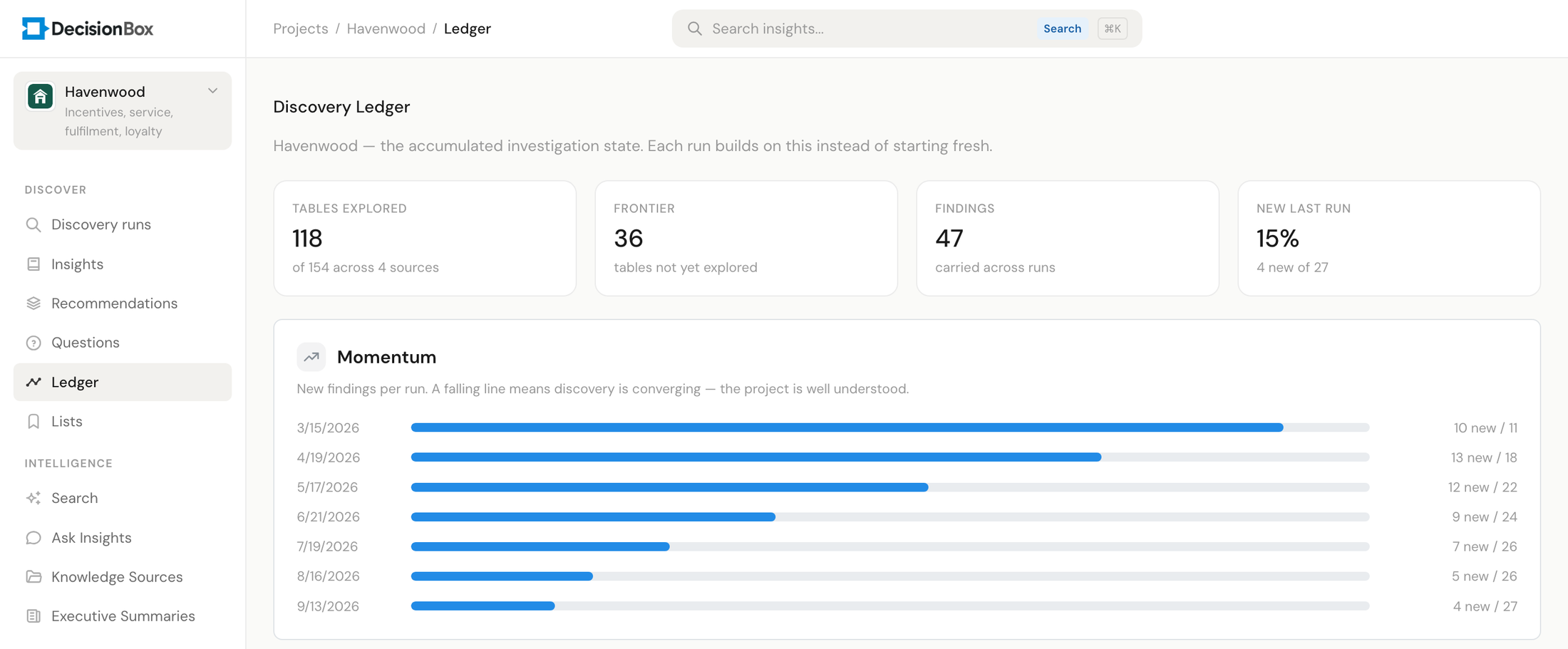
When the run finishes, it records what it covered, what it found, and what it could not finish in the project's Discovery Ledger. The next run opens with that instead of a blank page — so it explores new ground and picks up the threads the last one left open.
This is what turns five steps into a loop. Run six is not run one repeated.
Try it in two minutes
Clone the repo, run docker compose up, and point it at your warehouse.